
Billing, Cancellations & Refunds
Last updated:
Kira subscriptions renew automatically until you cancel. Where you manage one depends on where you bought it: on the web at kira.art, in the App Store, or on Google Play. Each block below shows only the steps for the platform you pick.
Where did you subscribe?
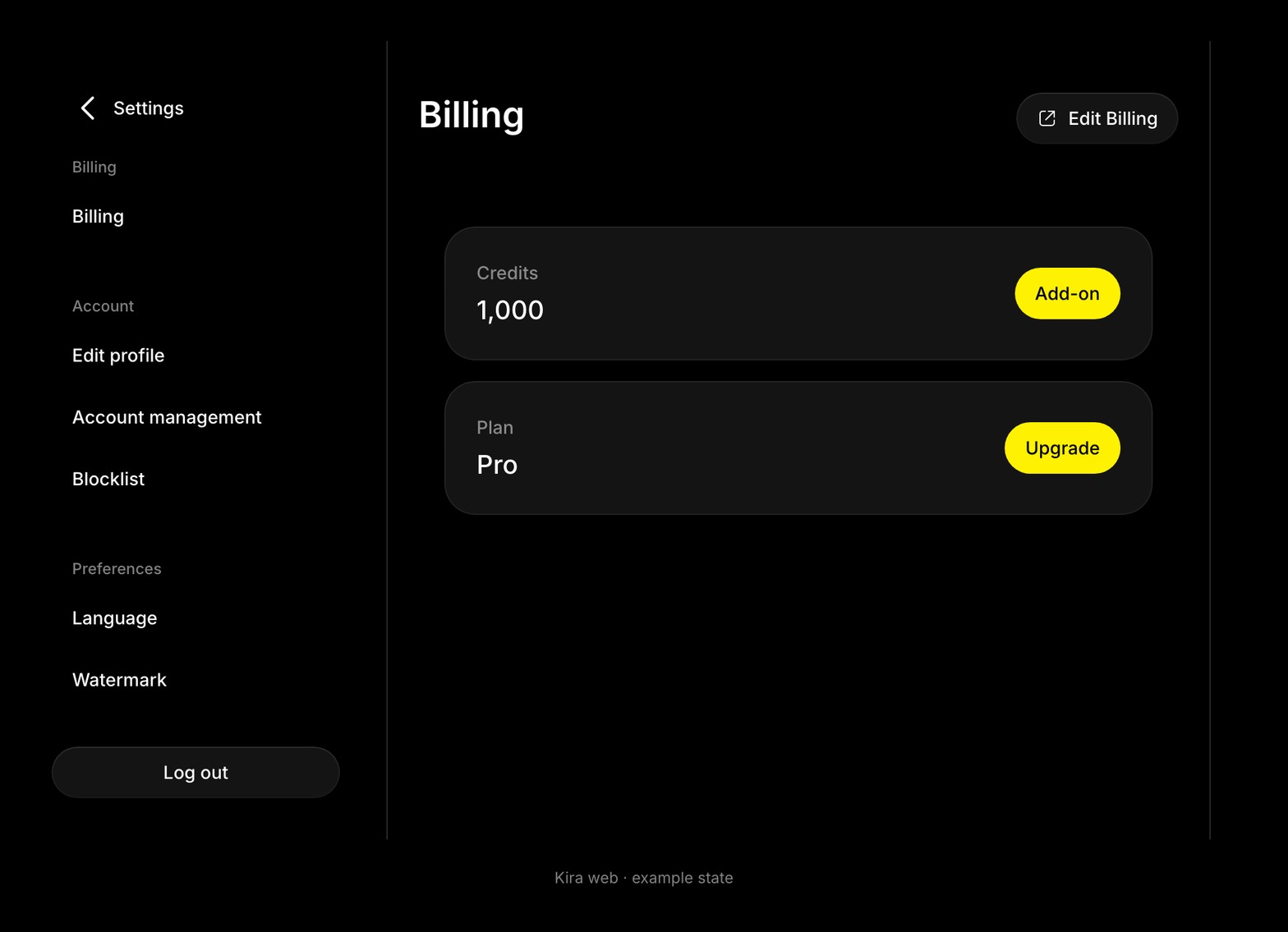
Open Profile → Settings → Billing. The Plan card tells you:
- Upgrade and Edit Billing are shown: you subscribed on the web. Edit Billing opens the billing portal, where the subscription, renewal date, payment method and invoices live.
- Your subscription was purchased on another platform: you subscribed in the App Store or on Google Play. Kira can show the plan but cannot change, cancel or refund it; your store can.
An add-on pack is a one-time purchase and never renews, so there is nothing to cancel for it. See Plans, Add-ons & Upgrades.
Cancel a subscription
- Sign in to the Kira account that has the subscription.
- Open Profile → Settings → Billing.
- Choose Edit Billing. The billing portal opens in a new tab.
- Choose Cancel subscription and confirm.
- Check the confirmation and the date your paid access ends.
Your plan stays active until the end of the period you already paid for, then the account returns to Free. Cancelling does not refund the current period.
Not sure? Open Settings → Billing. If the Plan card says your subscription was purchased on another platform, it is an App Store or Google Play subscription, and the web cannot change it.
After you cancel:
- Your paid plan keeps working until the end of the period you already paid for.
- No new allowance is issued after that date, and the remaining subscription credits are cleared.
- Add-on credits stay on the account.
- Your account, projects and posts are untouched. The account simply returns to Free, so exports carry the watermark again and Nova, Ultra and video tools lock.
If you only want to stop paying, cancel. Do not delete the account; deletion does not cancel a store subscription, and it erases your work. See Account Deletion.
Update a payment method or fix a failed payment
On the web, choose Edit Billing and update the card in the portal. For a store subscription, update the payment method in your Apple or Google account.
When a renewal fails, the payment provider retries and may email you. Until it succeeds, paid access or the new credit allowance can pause. If a payment went through but Kira still shows the old plan, refresh Billing, check you are signed in to the right account, and in the app use Restore Subscription on the upgrade screen. Contact support if it still does not match.
Find an invoice or receipt
- Open Profile → Settings → Billing.
- Choose Edit Billing to open the billing portal.
- Open the invoice history. Every subscription payment and add-on pack has an invoice and a receipt you can download.
Web payments are processed by Stripe, so receipts live in the billing portal rather than on your Kira profile.
Not sure? Open Settings → Billing. If the Plan card says your subscription was purchased on another platform, it is an App Store or Google Play subscription, and the web cannot change it.
Ask for a refund
- Check Settings → Billing and the billing portal first: the plan, the renewal date, and whether the charge was a subscription or an add-on pack.
- Email [email protected] or use the live chat in Kira. Include the account email, the payment date and amount, the invoice number, and what went wrong.
- Do not send card numbers or passwords. Support replies with the decision.
Fees are non-refundable except where the law requires it. Kira may refund at its discretion for a billing error, a duplicate charge or other exceptional circumstances. Unused credits or an unused period are not an automatic refund.
Not sure? Open Settings → Billing. If the Plan card says your subscription was purchased on another platform, it is an App Store or Google Play subscription, and the web cannot change it.
Kira's web refund rule in one line: fees are non-refundable except where the law requires it, and Kira may refund at its discretion for a clear billing error, a duplicate charge or other exceptional circumstances. An unused balance or an unused part of the period does not qualify on its own. Credits are not cash, cannot be transferred and cannot be exchanged for money. The Terms of Use have the full wording.
For a store purchase, Apple or Google decides. If they approve, the credits or plan from that purchase are removed from your Kira account.
Questions about a charge
A charge I don't recognise. Check the purchase account, the platform, the renewal date and any add-on receipts in the portal or your store history. If you believe a payment was not authorised, also follow your bank's guidance.
I picked monthly but was charged for a year. The checkout shows the billing period and the total before you confirm, and an annual price is sometimes displayed as a monthly equivalent. Contact support with the invoice; web refunds are at Kira's discretion, store refunds are Apple's or Google's.
I was charged after I asked to delete my account. A deletion request does not cancel a subscription. Cancel it on its platform, then check the next renewal date.
I upgraded and was charged the full price. Web upgrades are charged as shown in the portal before you confirm. Apple charges the difference for an immediate upgrade. If what you paid does not match what was shown, send support the invoice.
Common questions
Can I cancel at any time?
Yes. Cancel on the platform where you subscribed and keep the confirmation.
Will I lose my creations if I cancel?
No. Cancelling never deletes projects, versions or posts.
I forgot to cancel. Can I get the renewal refunded?
Renewal is automatic unless you cancel in time, so a missed date is not an automatic refund. Ask anyway: on the web, email support with the invoice; for a store purchase, ask Apple or Google.
Can Kira cancel my Apple or Google subscription?
No. Only you can, in the store account that made the purchase.