
Sample Prompts: Pose References & Face Swaps
Last updated:
Reference-based edits work best when the prompt explains the role of each image. A subject photo and a pose reference should not be treated as interchangeable.
Use Image Edit, upload the relevant images, and keep the requested change focused. These prompts describe an intended result; they do not guarantee exact identity or pose preservation.
Copy a pose from a reference
- Image 1: the subject whose face, clothing, and scene you want to retain.
- Image 2: the pose guide.
Try:
Image 1 is the subject. Image 2 is a body-pose reference only. Preserve the face, hairstyle, outfit, lighting, background, and framing from image 1. Change only the subject's body pose to match image 2. Do not borrow its face, clothing, or scene.
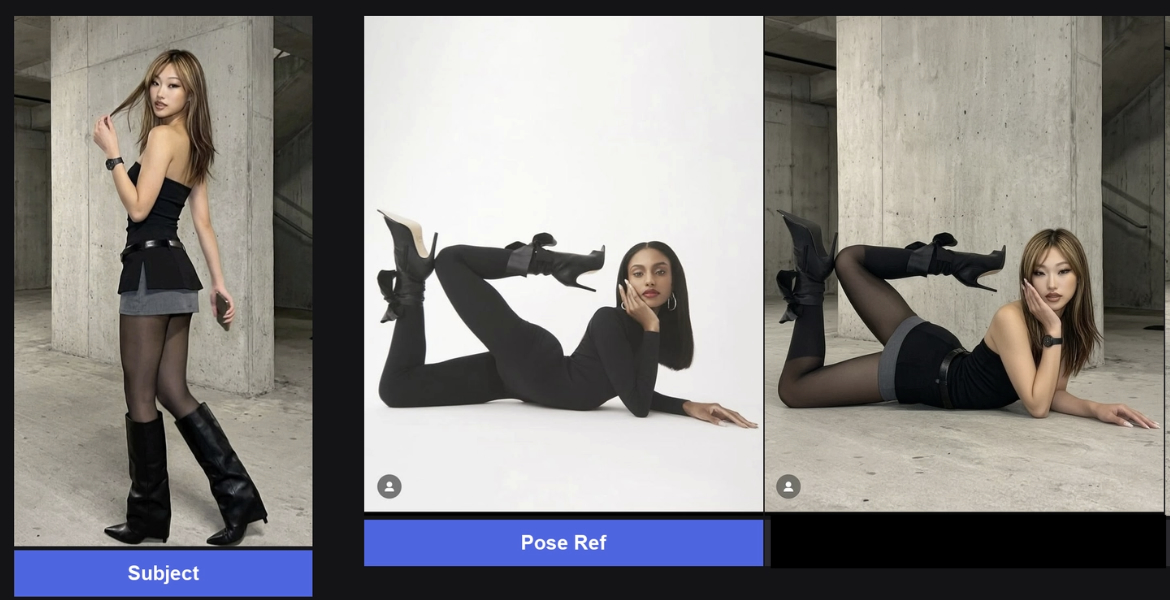
Describe a pose in words
With only the subject image, describe body parts and camera direction rather than a vague mood. For example:
Preserve the person's face, hairstyle, outfit, lighting, and background. Change only the pose: standing upright facing the camera, weight shifted slightly to the right leg, right hand resting on the right hip, left arm relaxed by the side. Keep the framing the same.
Use the subject's anatomical left and right, and say so when the distinction matters. For a complex pose, describe the feet, knees, hips, torso, head, and arms separately.
Face and hair from another reference
- Image 1: the face and hair reference.
- Image 2: the body, outfit, pose, and scene to retain.
Try:
Replace the face and hair in image 2 with the face and hair from image 1. Keep the outfit, pose, background, framing, and lighting of image 2. Do not restyle the scene.
Use images you have the rights and permissions to edit. Review facial detail and blending carefully before sharing the result.
Troubleshoot reference confusion
If Kira borrows the wrong clothing or scene, restate each image's role and reduce the number of changes. “Pose reference only” and “keep the background from image 1” are clearer than “make these match”.
If you want to point at an exact area, use Sketch alongside a short written instruction. For costs and retries, see Credits & Usage.